Photographers and videographers
Model release forms, signed before you lift the camera
A model release form is your subject’s signed permission to use their likeness in your photos or video, so you can share, sell and license your work with confidence. They sign on your phone at the shoot, or on their own phone before they arrive, and you have their signed release on record the moment they finish.
No card needed, and you’ll be signing waivers within minutes.
- Free model release form template
- Signed PDF for you and your subject
- Works with no signal
- UK company, UK and EU data
- iPhone, iPad and Android apps
- Free for 25 waivers a month
Show you had permission whenever an image is used
A signed model release lets you use your work the way you both agreed, gives you a measure of legal protection later and shows your subject exactly what they said yes to. If a recognisable person appears in work you plan to sell, license, use in advertising or submit to a stock library, it is the simplest way to show you have their permission.
- Many photographers ask for one at every paid shoot, so it is never in doubt months later when a client wants to use an image somewhere new
- In the UK, the ICO says that if someone can be recognised from a photograph it is usually considered their personal data. A signed, dated release that spells out the uses gives you a clear record that you told people up front what you’ll do with their images
- A verbal yes or an old email is hard to find and harder to prove. A signed release is always with the shoot it belongs to
What a good model release records
- Who is involvedThe subject’s full name and contact details, and you or your business as the photographer or videographer.
- Which shoot it coversThe shoot or project name and the date, so each release matches the images it belongs to.
- How the images may be usedPortfolio, social media, promotional or commercial use, and any uses your subject has asked you to leave out.
- Anything given in returnA fee, free images or another exchange, often called consideration, if your release refers to one.
- A parent or guardian for minorsWhen your subject is under 18, a parent or legal guardian completes the release on their behalf.
- Signature and dateThe signed agreement, with the date and time it was signed, kept with the wording that was agreed.
Get the release done in under a minute and back to the shoot
-
Signed before they arrive
Your subject signs on their own phone before the shoot, from a link or a QR code. You arrive knowing every release is done.
Share links -
Works on location with no signal
Beaches, woodland, basements and venues with overloaded Wi‑Fi. Your phone keeps taking signed releases, and every one is waiting in your account when you’re back online.
Offline mode -
Under 18s handled properly
Check the age on the form, not by eye. When your subject is under 18, the form asks for a parent or guardian to complete it, and adults go straight through without the extra question.
Conditional questions -
Told the moment a release comes in
Know the moment each release is signed, and your subject can have a copy of exactly what they agreed to in their inbox.
Notifications and receipts -
Every release filed by shoot
Keep each wedding, campaign or production separate, with its own releases, dates and team. No more hunting through camera rolls for a photo of a form.
Collections -
Hand releases to your client
When a client, agency or picture desk asks, hand over every signed release for that shoot in one go, as PDFs or a spreadsheet.
Exports
A free model release form template, ready to use
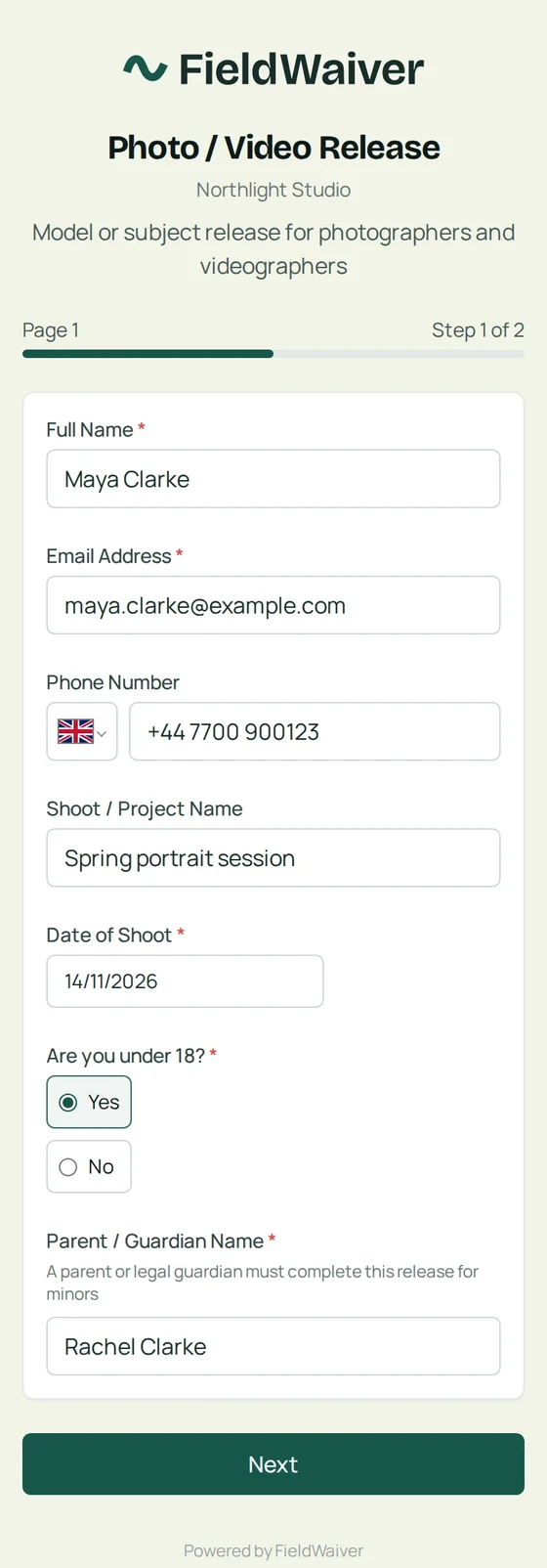
Start from the Photo / Video Release and your model release is ready to send in a couple of minutes. Change any field or any word to fit how you work. Want to list the exact uses, add a fee or exclude certain channels? Edit the wording, or let your subject tick the uses they’re happy with. See all the built-in forms.
- Full name, email address and phone number
- Shoot or project name and the date of the shoot
- Whether they are under 18, with a parent or guardian name when they are
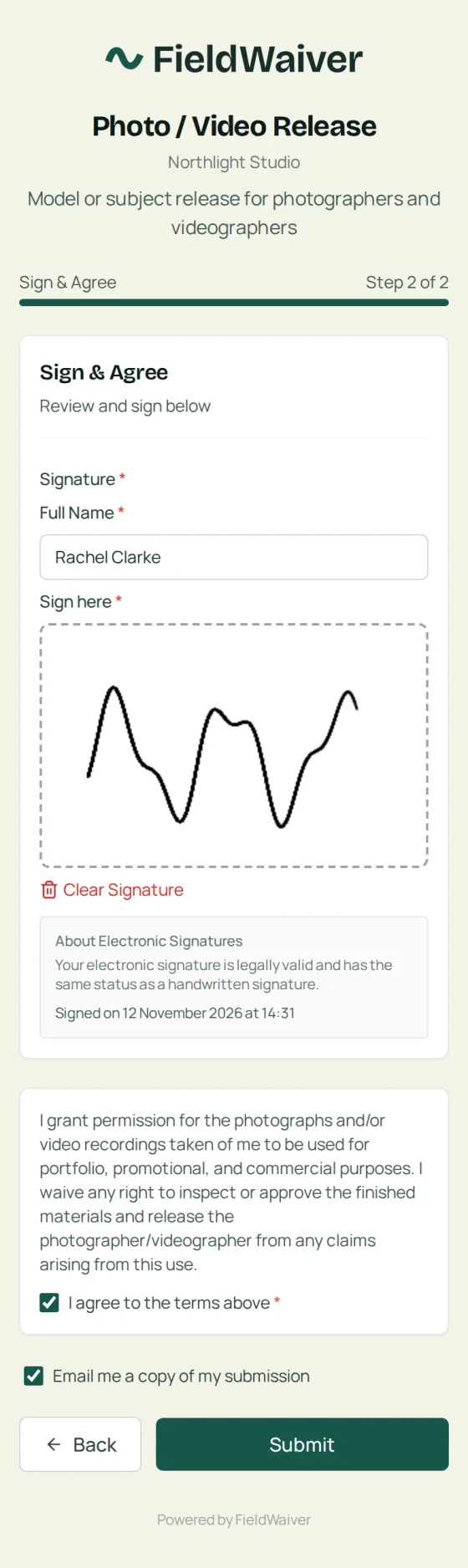
- Their signature, with the date and time it was signed
- Release wording they agree to, “I grant permission for the photographs and/or video recordings taken of me to be used for portfolio, promotional, and commercial purposes. I waive any right to inspect or approve the finished materials and release the photographer/videographer from any claims arising from this use.”
- Already have a release your adviser wrote? Bring the PDF or Word file and your own wording is ready to sign, word for word
Model releases for every kind of shoot
Videographers use the same idea for on-screen talent, contributors and crew, and a location or property release when you film on someone else’s premises.
-
Portrait and family sessions
Send the release with your booking confirmation so parents sign at home, then walk straight into the session.
-
Weddings and private events
Guests who will feature in your portfolio give their consent on your phone or a tablet at the venue, without slowing the day down.
-
Brand and commercial shoots
Get model and talent release forms signed by everyone in front of the camera before the first frame.
-
Video and film productions
Contributor releases, crew agreements and location releases sit together under each production, ready when the edit needs them.
-
Event photography and filming
Covering a conference, festival or awards night? Get a room full of people through consent quickly on several devices at once. See how event organisers and corporate events use it.
-
Location and property releases
Show exactly who said yes and how you found the space, with the property owner’s details, the dates you’ll be on site and a photo of the space in one release.
Good to know before you file your releases
- One release per personEveryone recognisable in your work signs their own, so each model release matches one person and one shoot. Get it signed before the shoot starts, as people are harder to reach once the day is over.
- Keep releases as long as you use the imagesKeep each signed release with its shoot for as long as you use the images, and longer if your adviser recommends it. Search for a name, open the shoot, or export the whole set when a client asks.
- Personal data stays in your accountPersonal data in your releases stays in your organisation’s account, and you can respond to deletion requests with the GDPR tools built in.
- Have your wording reviewedThis is general information, not legal advice. Have your final release wording reviewed for the way you work.
Free templates for photographers and videographers
Read every word before you sign up, then change anything to make it yours.

Photography model release questions
Something else? Ask us and we’ll reply within one working day, usually the same day.
What is a model release form?
A model release form is a short agreement in which the person you photograph or film gives you permission to use their likeness. It names the people involved, the shoot, how the images may be used and when it was signed. FieldWaiver collects it as a signed digital record on your phone or tablet, or on the subject’s own phone.
Do I need a model release form for every shoot?
Not always. You usually want one whenever a recognisable person appears in work you will use commercially, in advertising or on a stock library, and many photographers ask for one at every paid shoot so it is never a question later. If you are unsure about a particular use, take advice on your own situation.
Is a digitally signed model release valid?
Electronic signatures are recognised in UK law, and section 7 of the Electronic Communications Act 2000 allows them to be admitted as evidence. Whether a release does what you need depends on its wording, so have your final wording reviewed. You get the signature, the wording the person agreed to and the date and time it was signed, kept together in one record. Read section 7 on legislation.gov.uk. Our guide Are digital waivers legally binding? goes further.
Can my subject sign on their own phone?
Yes. Send a share link or show a QR code and they sign on their own phone before the shoot or on the day. If you would rather hand over your own phone or tablet, they can sign on that instead.
What if there is no signal at my location?
You can still take releases. Open your release form on your phone or tablet while you still have a connection. At the location your device keeps collecting signed releases with no signal, and they sync to your account on their own when you are back online. Your subject can sign your link on their own phone with no signal too, as long as they open it once while they have signal.
How do I get a release for someone under 18?
The template takes care of it. The built-in Photo / Video Release asks whether the subject is under 18. If the answer is yes, it shows a required field for the parent or guardian’s name and tells them a parent or guardian must complete the release.
Can I use my own release wording?
Yes. Edit the template wording, add your own questions and limits of use, or build a release from a blank form. Location, property, talent and crew releases are built the same way.
How much does it cost?
You can start free with 3 forms and up to 25 signed releases a month. Starter is £12 a month for unlimited forms, 3 users and up to 300 signed releases a month. Plans and limits.
Get your next release signed in seconds
Start free with the Photo / Video Release template.
Free for 25 waivers a month for as long as you like, with no card needed.